

Custom Crystal Photo Engraving Process: A Step-by-Step Guide
Sep 28th 2026
Table of Contents
- What Is 3D Crystal Photo Engraving?
- How to Prepare Photos for 3D Crystal Engraving
- The 5-Step Crystal Engraving Process
- Custom Crystal Photo Gift Turnaround Time
- Choosing a 3D Laser Crystal Company in 2026
- Durability and Long-Term Care of Crystal Engravings
- Common Mistakes to Avoid
- Frequently Asked Questions
Last Updated: September 27, 2026
What Is 3D Crystal Photo Engraving?
Three-dimensional crystal photo engraving is a process that transforms your favorite photographs into stunning keepsakes by using laser technology to create detailed images inside optical crystal. The laser burns microscopic points beneath the crystal's surface, forming a three-dimensional representation of your photo that appears to float within the glass.
At Crystal Prints, we've spent over 22 years perfecting this technique. The custom crystal photo engraving process starts with your image and ends with a finished piece that captures every detail, from facial expressions to background elements, all preserved inside crystal that will last for generations.
Unlike a printed photo that can fade, this method creates a permanent keepsake. The laser etching happens below the surface, protecting the image from damage. When light passes through the crystal, it refracts around the engraved points, making the image visible from multiple angles.
The technology relies on focused laser pulses that create micro-fractures at precise depths within the optical crystal. Each pulse is carefully controlled to build the three-dimensional image layer by layer. The result is a gift that feels as meaningful as it looks.
How to Prepare Photos for 3D Crystal Engraving
The quality of your final engraved crystal depends heavily on the photo you start with. Preparation is critical because the laser can only work with the detail your image contains.
Image Resolution and File Quality Requirements
Your photograph needs sufficient resolution to translate into a clear three-dimensional engraving. The custom crystal photo engraving process requires images with enough pixel density to capture fine details like facial features, text, and background elements.
High-resolution images work best. A minimum of 300 DPI (dots per inch) is standard for quality results. Images smaller than 4x6 inches at 300 DPI may lose detail during conversion to the three-dimensional format.
Color photos work well, but the engraving itself appears in grayscale inside the crystal. The laser creates depth through varying intensities of micro-fractures, not color. Black and white photos often produce excellent results because contrast naturally translates to depth perception in the finished piece.
File formats matter too. JPEG, PNG, and TIFF files all work. Keep your original file size reasonable, typically under 10 MB, to avoid processing delays.
Shoot your photos in good lighting. Natural light produces the best results because it creates clear contrast between light and shadow areas. These variations become depth in your engraved crystal.
Handling Low-Resolution or Aged Photos
Many people want to engrave older photographs from the 1980s or 1990s. These images are often grainy or low-resolution. The good news: professional image enhancement can help.
Aged photos benefit from upscaling and restoration. Modern image processing software can increase resolution and reduce grain. This doesn't add detail that wasn't there, but it clarifies what exists.
Crystal Prints offers expert image editing services to improve your photo before engraving. Our team can:
- Reduce grain and noise in old photographs
- Enhance contrast to improve depth perception
- Restore faded colors in vintage images
- Crop and reframe your photo for better composition
- Adjust brightness and clarity for optimal laser conversion
If your photo is very small or extremely degraded, honest conversation matters. Some images have physical limitations. A 1x1 inch photo from 40 years ago won't magically gain detail, but skilled editing can maximize what's possible.
The 5-Step Crystal Engraving Process
The custom crystal photo engraving process follows a precise workflow. Each step builds on the previous one to transform your image into a three-dimensional keepsake inside crystal.
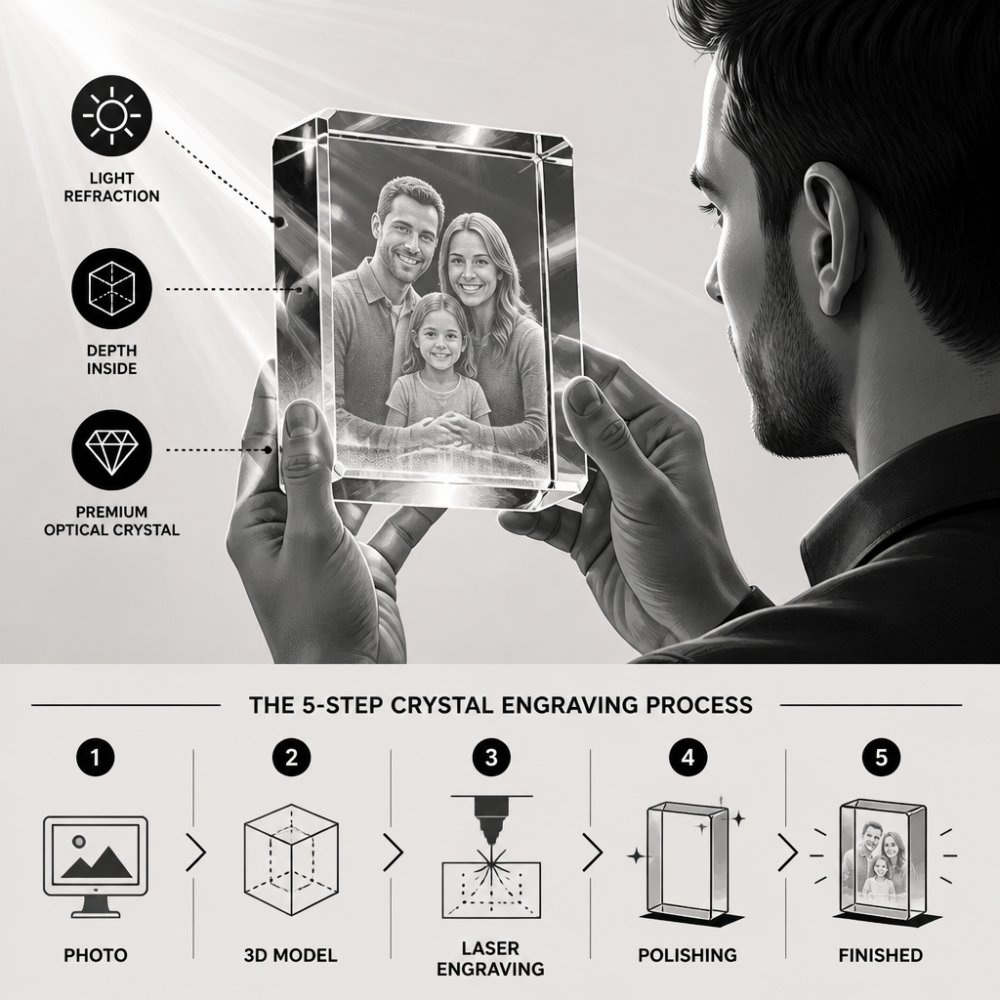
Step 1: Image Analysis and Enhancement
Your photograph arrives at our facility and undergoes detailed analysis. We examine resolution, contrast, color balance, and any damage or degradation. This assessment determines what enhancement work will improve your final result.
Our team uses specialized software to analyze pixel density and tonal range. If your image needs adjustment, we enhance it during this phase. Brightness is corrected, contrast is optimized, and any grain is reduced. The goal is to maximize the information available for conversion to three-dimensional format.
This step takes care of common issues customers worry about. That old photo of your late father from the 1980s? We can improve it. The slightly blurry picture from your wedding? We can sharpen it. The image that's too dark? We can brighten it while preserving detail.
Step 2: 2D to 3D Conversion and Point Cloud Generation
Once your image is optimized, specialized software converts it from two-dimensional to three-dimensional data. This is where the magic happens. The software analyzes every pixel and assigns it a depth value based on brightness and contrast.
Darker areas in your photo become deeper points in the crystal. Lighter areas sit closer to the surface. This creates the illusion of depth, your face appears to exist in three dimensions inside the crystal.
The software generates what's called a point cloud: millions of coordinate points that define exactly where the laser will fire inside the crystal. Each point has X, Y, and Z coordinates. The Z coordinate determines depth, how far below the crystal's surface the laser will strike.
Order your personalized laser-engraved gift today →
High-resolution images produce denser point clouds with more detail. This is why image quality matters so much. A low-resolution image creates a sparse point cloud that may lose fine details like small facial features or text.
Step 3: Laser Beam Focusing and Depth Calibration
Before engraving begins, the laser system must be precisely calibrated. The laser beam is focused to create micro-fractures at exact depths within the crystal.
Optical crystal has specific refractive properties. Light bends as it passes through glass. The laser must account for this refraction to hit the correct depth inside the crystal. Calibration ensures that when we aim for 5 millimeters deep, we hit exactly 5 millimeters, not 4.8 or 5.2.
The laser beam itself is incredibly thin, sometimes just a few micrometers in diameter. This allows fine detail. Multiple passes build the complete image, with each pass addressing a different depth layer.
Temperature control matters during this phase. Crystal expands and contracts slightly with temperature changes. The calibration accounts for this to maintain precision throughout the engraving process.
Step 4: Subsurface Laser Engraving
The actual engraving happens now. The laser fires thousands of pulses into the crystal, each one creating a tiny point of internal damage. These micro-fractures scatter light, making them visible.
The laser moves in a precise pattern, guided by the point cloud data from step two. It works layer by layer, starting at the deepest points and working toward the surface. This approach prevents cracks and ensures clean, precise etching.
The process is slow and deliberate.
Step 5: Inspection and Quality Control
After engraving completes, your crystal undergoes rigorous inspection. We examine it under bright light to verify image clarity, check for any cracks or defects, and confirm that all details transferred correctly.
Our team looks for:
- Clear image visibility from multiple angles
- Proper depth and three-dimensional appearance
- No cracks or fractures in the crystal
- Consistent laser etching throughout
- Accurate reproduction of your original photo
Custom Crystal Photo Gift Turnaround Time
How long does the custom crystal photo engraving process take from start to finish?
Choosing a 3D Laser Crystal Company in 2026
Not all crystal engraving providers are equal. The quality of your finished keepsake depends on the company's equipment, expertise, and commitment to detail.
- Years of experience in the industry
- Quality of their optical crystal material
- Technology used for laser engraving
- Image editing capabilities
- Customer reviews and testimonials
- Shipping and packaging standards
- Whether products are made in the USA
Durability and Long-Term Care of Crystal Engravings
How long does a 3D crystal engraving last? The short answer: indefinitely, with proper care.
Basic care keeps your crystal looking pristine:
- Dust regularly with a soft, dry cloth
- Avoid harsh chemicals or abrasive cleaners
- Keep away from extreme heat or cold
- Display in stable indoor conditions
- Handle gently to prevent drops
Common Mistakes to Avoid
Understanding what goes wrong helps you make the right choices for your custom crystal photo engraving.
Frequently Asked Questions
Can any photo be converted into a 3D crystal engraving?
Most photos can be converted, but image quality matters. High-resolution photos with clear subjects and good contrast convert best. Older or low-resolution photos can still work, professional image editing can enhance clarity and detail before conversion. However, extremely pixelated or very small images may not produce the depth and detail you want. The engraving process relies on precise spatial mapping, so starting with the best possible source image ensures the best final result.
How long does a custom crystal photo gift typically take to create?
Turnaround time depends on order volume and complexity. Rush options are sometimes available. Contact the provider directly for current turnaround estimates and any expedited shipping options, as timelines can vary based on current demand.
How does subsurface laser engraving create a 3D image inside crystal?
A focused laser beam creates micro-fractures at precise depths within the optical crystal, forming a 3D point cloud of the image. The laser doesn't cut the surface; instead, it etches internally, creating volumetric data that produces depth perception. Light refracts through these internal fractures, revealing the engraved image when viewed from certain angles. This internal etching preserves the crystal's smooth surface and optical clarity while creating a stunning 3D effect.
Will my crystal engraving yellow or become cloudy over time?
High-quality optical crystal resists yellowing and cloudiness for decades when properly maintained. The subsurface engraving is protected inside the crystal, shielded from UV exposure and environmental damage. Longevity depends on crystal quality and storage conditions. Keep your keepsake away from direct sunlight and extreme heat, and clean it gently with a soft, lint-free cloth. With proper care, a crystal engraving can become a true heirloom passed down through generations.